Architecture
Jeni uses a layered Streamlit architecture. The application shell is defined in app.py, provider and cloud workflows are implemented in gemini.py, and runtime constants, model lists, paths, help text, and API defaults are centralized in config.py.
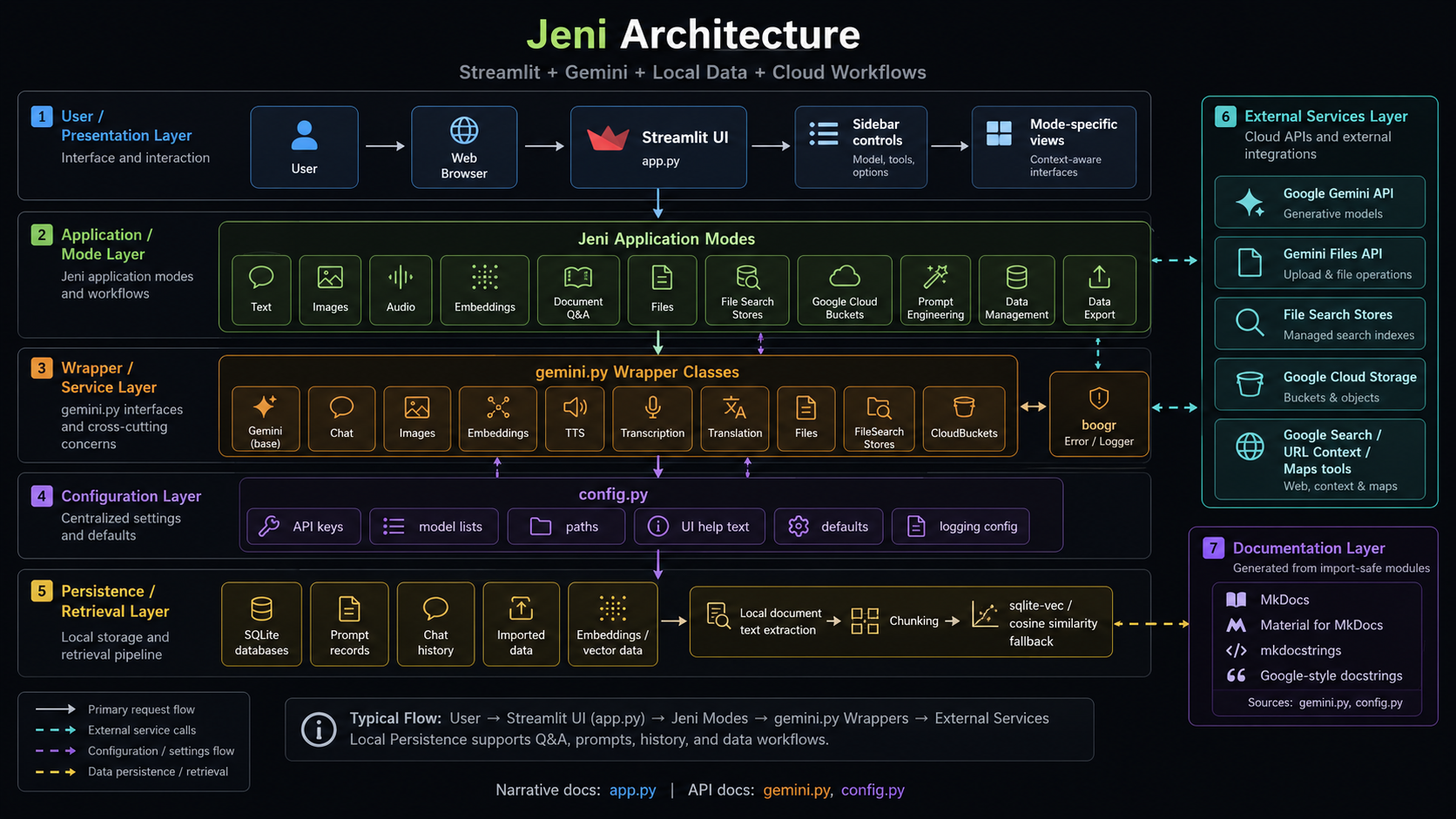
High-Level Layers
| Layer | Responsibility |
|---|---|
| UI Layer | Streamlit sidebar, expanders, tabs, chat messages, uploaders, data editors, charts, and status areas. |
| Mode Layer | Mode-specific blocks for Text, Images, Audio, Embedding, Document Q&A, Files, Stores, Buckets, Prompt Engineering, Data Export, and Data Management. |
| Wrapper Layer | Gemini helper classes: Chat, Images, Embeddings, Transcription, Translation, TTS, Files, FileSearch, and CloudBuckets. |
| Configuration Layer | Constants, environment-variable readers, model option lists, file paths, UI help text, and provider settings in config.py. |
| Persistence Layer | SQLite databases under stores/sqlite, including chat history, embeddings, prompt records, and imported data. |
| Retrieval Layer | Text extraction, normalization, chunking, sentence-transformers, sqlite-vec, and cosine similarity fallback. |
| Error Layer | boogr error and logger classes used across application and wrapper methods. |
Request Flow
User Input
  ↓
Streamlit Mode Controls
  ↓
Session-State Values and Configuration Defaults
  ↓
Mode-Specific Request Builder
  ↓
Gemini Wrapper Class
  ↓
Google Gemini / Files / Stores / Cloud Bucket API
  ↓
Response Normalization, Usage Capture, Sources, or Output Files
  ↓
Streamlit Display and Optional SQLite Persistence
Application Shell
app.py initializes Streamlit session-state keys, wires the UI, configures runtime API keys, manages local document state, persists chat and prompt data, renders tables and charts, and routes user workflows into the Gemini wrappers.
Because app.py performs Streamlit session-state work at import time, it is not safe to render directly with mkdocstrings until the runtime section is moved behind a main() function and guarded with:
if __name__ == "__main__":
    main()
Provider Wrappers
gemini.py contains import-safe provider classes when application dependencies are installed. The wrapper layer centralizes:
- model options;
- inference configuration;
- tool options;
- reasoning options;
- modality options;
- provider request construction;
- response normalization;
- file workflows;
- file-search store workflows;
- cloud bucket workflows;
- Boogr logging patterns.
Configuration Layer
config.py centralizes:
- API key environment lookups;
- local paths;
- application title and branding paths;
- Gemini modes;
- model option lists;
- help text for UI controls;
- database locations;
- logging defaults;
- regular-expression patterns for prompt and markup conversion.
Persistence and Retrieval
Jeni uses SQLite for local state and data workflows. Document Q&A uses extracted text, chunking, embeddings, and vector retrieval. When sqlite-vec is available, embeddings can be stored and queried in SQLite vector tables. When it is not available, the application falls back to local cosine similarity.
Documentation Generation Model
This documentation uses Material for MkDocs and mkdocstrings[python]. API pages import modules from the repository root using:
plugins:
  - mkdocstrings:
      handlers:
        python:
          paths:
            - .
          options:
            docstring_style: google
Import-Safety Rules
A module should not be used with ::: module_name when it performs runtime work during import, such as:
- launching Streamlit UI code;
- mutating
st.session_state; - calling external APIs;
- requiring live credentials;
- loading large local models;
- opening sockets;
- writing files or databases at import time.
For Jeni, document gemini.py and config.py directly first. Keep app.py narrative-only until it is refactored into import-safe functions.