Architecture
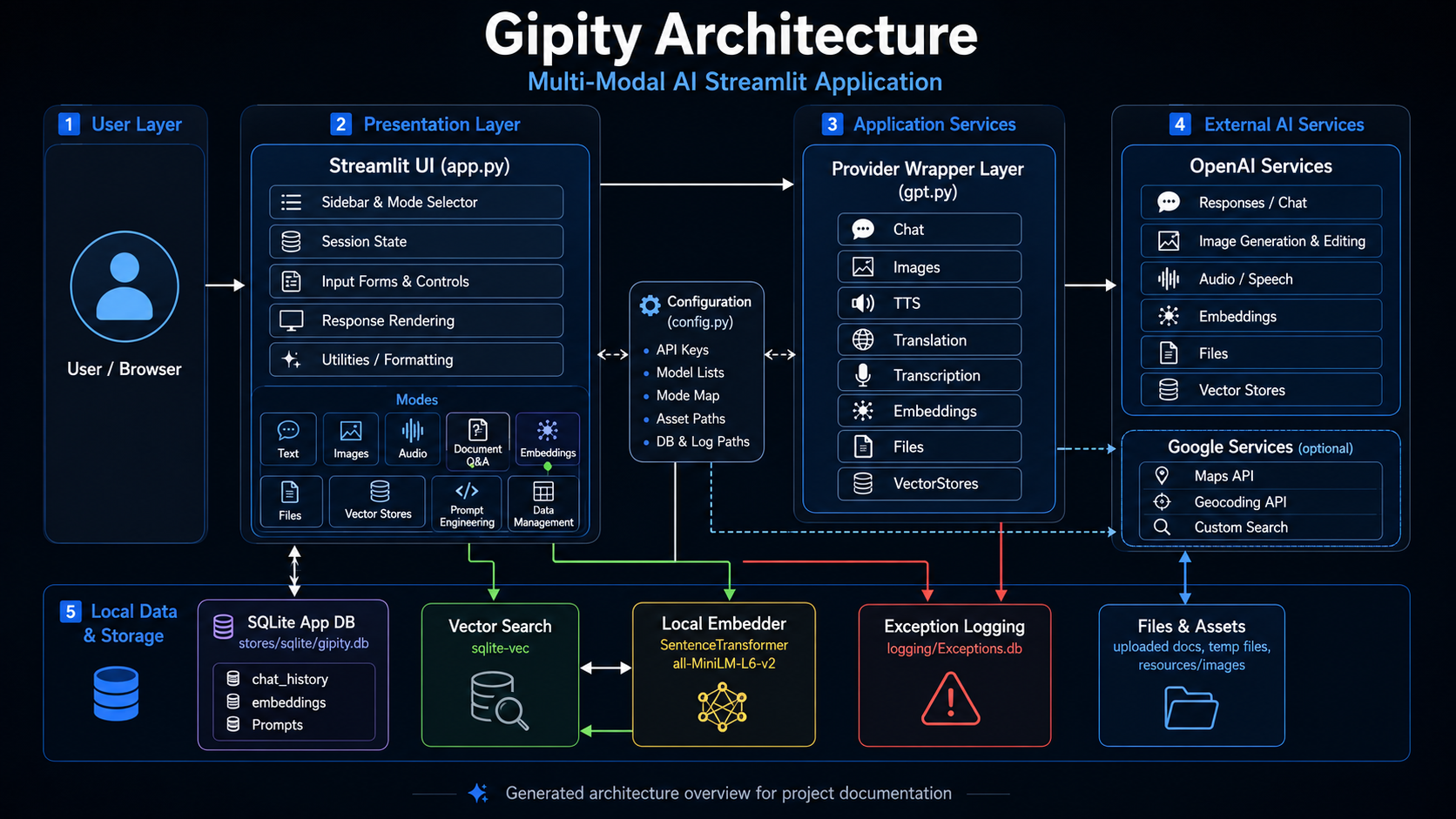
Overview
Gipity is organized around a Streamlit application shell, a configuration layer, provider wrappers, local storage, and static documentation generation.
System Structure
Streamlit UI
    |
    |-- app.py
    |     |-- Session state initialization
    |     |-- Mode rendering
    |     |-- Upload handling
    |     |-- Local retrieval helpers
    |     |-- Display helpers
    |     |-- Token tracking
    |     |-- Workflow orchestration
    |
    |-- config.py
    |     |-- Environment-variable helpers
    |     |-- Paths
    |     |-- API keys
    |     |-- Model lists
    |     |-- UI constants
    |     |-- Prompt and workflow constants
    |
    |-- gpt.py
          |-- GPT base wrapper
          |-- Chat
          |-- Images
          |-- Embeddings
          |-- TTS
          |-- Transcription
          |-- Translation
          |-- Files
          |-- VectorStores
Application Shell
app.py is the main Streamlit entry point. It coordinates page setup, session state, user controls,
workflow routing, output rendering, document handling, token tracking, and integration with provider
wrappers.
Because app.py is a Streamlit runtime module, it is documented manually in this documentation site
rather than imported directly by mkdocstrings.
Configuration Layer
config.py centralizes paths, API keys, model lists, prompt constants, logging settings, database
paths, and other application-level defaults.
This module is suitable for mkdocstrings API documentation.
Provider Wrapper Layer
gpt.py contains the OpenAI provider wrapper classes used by the application. These wrappers
coordinate request construction, provider calls, response capture, validation, and error logging for
GPT-backed workflows.
This module is suitable for mkdocstrings API documentation.
Local Storage
Gipity uses local SQLite-backed storage for application data such as prompts, history, embeddings, and other workflow records where implemented.
Documentation Generation Model
MkDocs builds the static documentation site from Markdown files under docs/.
mkdocstrings imports selected Python modules and renders their Google-style docstrings into API
reference pages.
The initial API reference strategy is:
Document with mkdocstrings:
    config.py
    gpt.py

Document manually:
    app.py
Import-Safety Rule
A module should only be documented directly with mkdocstrings when it is safe to import during a
documentation build.
A module may be risky to import when it:
- Starts a Streamlit app at import time.
- Requires credentials during import.
- Calls external APIs during import.
- Loads large local models during import.
- Opens files, sockets, or databases during import.
- Mutates application state during import.
No Source Refactor Required
This documentation approach does not require reorganizing Gipity source code.
The working application can remain as-is while the documentation layer is added beside it.