Architecture
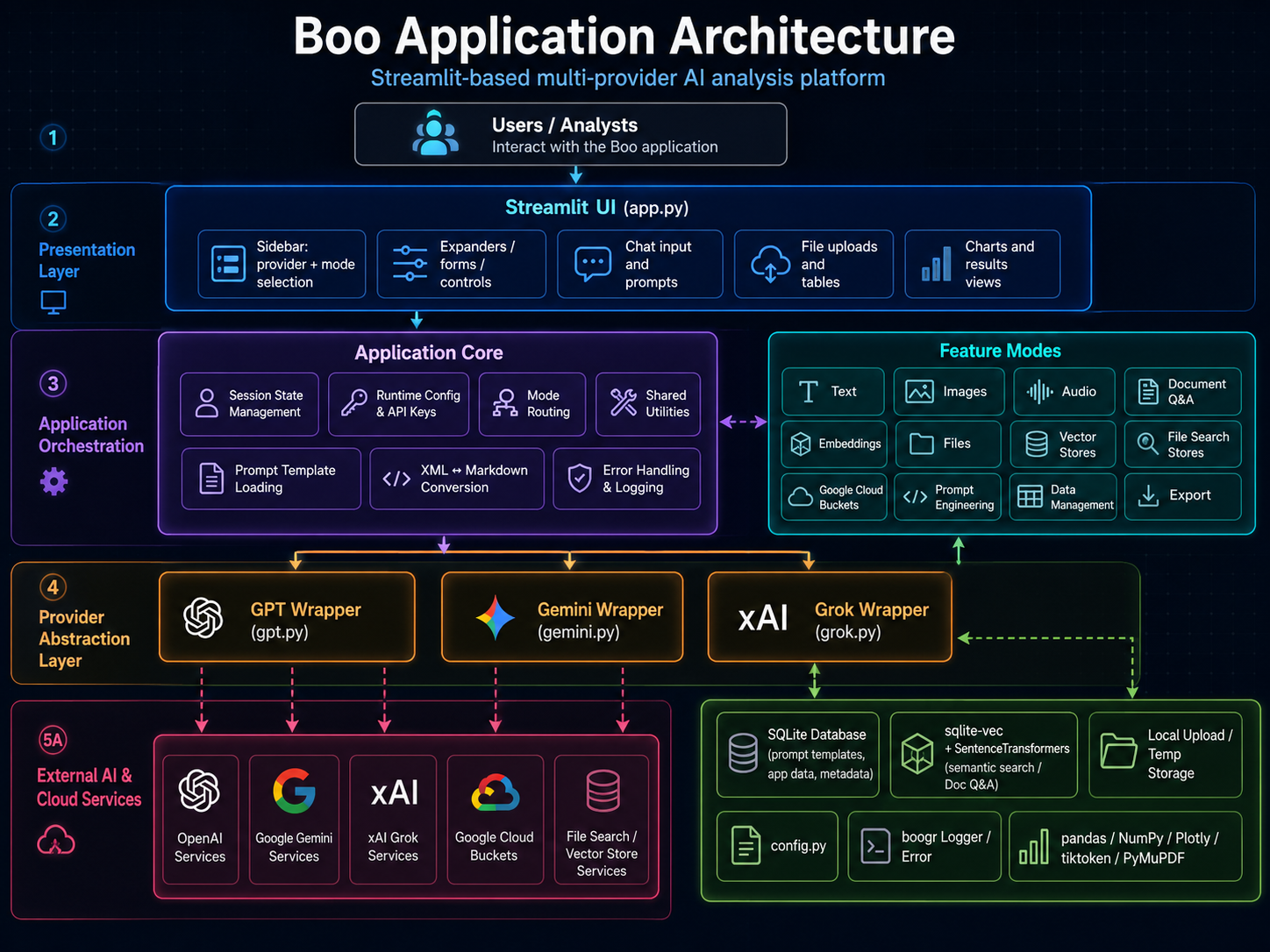
Boo uses a conventional layered structure:
- Streamlit UI layer renders controls, tabs, inputs, uploaders, result panels, and workflow status messages.
- Application orchestration layer reads user selections, validates required inputs, updates
st.session_state, and routes work to the selected provider. - Provider wrapper layer encapsulates OpenAI, Google Gemini, and xAI Grok SDK calls behind provider-specific Python classes.
- Persistence and file layer handles temporary uploads, provider files, vector stores, and downloadable outputs.
- Documentation layer uses MkDocs and mkdocstrings to generate human-readable API reference material from Google-style Python docstrings.
System Context
User
 |
 v
Browser
 |
 v
Streamlit Runtime
 |
 v
app.py
 |
 +--> gpt.py    ----> OpenAI APIs
 |
 +--> gemini.py ----> Google Gemini APIs
 |
 +--> grok.py   ----> xAI Grok APIs
 |
 +--> local files, session state, temporary artifacts, and documentation assets
Application Modules
| Module | Architectural Role | Primary Responsibility |
|---|---|---|
app.py |
UI shell and workflow router | Owns Streamlit layout, session state, model selection, workflow selection, and result rendering. |
gpt.py |
OpenAI provider wrapper | Encapsulates GPT text, images, audio, embeddings, files, vector stores, and assistant workflows. |
gemini.py |
Gemini provider wrapper | Encapsulates Gemini text, multimodal, file, and grounded-generation workflows. |
grok.py |
Grok provider wrapper | Encapsulates xAI Grok text, image-capable, file, embedding, and vector-store workflows. |
config.py |
Configuration boundary | Centralizes API keys, model names, feature flags, local paths, and constants. |
booger.py or logging helpers |
Error handling | Normalizes exception capture, metadata assignment, and user/developer-facing logging. |
docs/ |
Documentation source | Stores MkDocs Markdown pages and API reference pages. |
Provider Isolation
The provider wrappers are intentionally separate from the Streamlit page code. This provides four practical benefits:
- Maintainability: provider SDK changes can be handled inside the wrapper without rewriting UI logic.
- Testability: wrapper methods can be tested independently from Streamlit rendering.
- Portability: provider-specific credential handling stays close to provider-specific calls.
- Documentation quality: classes and methods can be documented through docstrings and rendered
by
mkdocstrings.
High-Level Component Map
Boo
 |
 +-- User Interface
 |    |
 |    +-- model selector
 |    +-- mode selector
 |    +-- prompt/document/file controls
 |    +-- output display panels
 |    +-- download controls
 |
 +-- Session State
 |    |
 |    +-- selected provider
 |    +-- selected model
 |    +-- selected workflow mode
 |    +-- uploaded files
 |    +-- intermediate results
 |    +-- final responses
 |
 +-- Provider Router
 |    |
 |    +-- OpenAI GPT wrapper
 |    +-- Google Gemini wrapper
 |    +-- xAI Grok wrapper
 |
 +-- Provider Services
 |    |
 |    +-- chat/text generation
 |    +-- image workflows
 |    +-- audio workflows
 |    +-- embeddings
 |    +-- files
 |    +-- vector stores
 |
 +-- Documentation
      |
      +-- MkDocs pages
      +-- mkdocstrings API reference
      +-- Google-style source docstrings
Request Flow
A normal user request follows this sequence:
- The user selects a provider, model, and workflow mode in the Streamlit interface.
- The UI writes the selected values into
st.session_state. - The user provides input such as a prompt, image, document, file, or configuration option.
- The application validates that the required inputs exist.
- The application routes the request to the selected provider wrapper.
- The provider wrapper validates method arguments and credentials.
- The wrapper creates the provider client only when needed.
- The wrapper sends the request to the provider SDK or API.
- The wrapper returns a normalized response to the Streamlit layer.
- The UI renders the response and stores any reusable result in
st.session_state.
Session-State Design
Streamlit reruns the script after widget interaction. For that reason, Boo uses session state to keep workflow selections and results stable across reruns.
The application should use explicit, workflow-specific keys. Avoid reusing one key for unrelated
data. For example, do not use a generic key such as documents for both raw uploaded files and
embedded chunks. Prefer names such as:
selected_model_name
selected_mode_name
uploaded_documents
parsed_documents
chunked_documents
embedding_results
vector_store_id
chat_response
image_response
audio_response
Provider Wrapper Contract
Each provider wrapper should follow a stable method contract:
| Contract Element | Requirement |
|---|---|
| Inputs | Accept typed arguments that match the workflow being executed. |
| Validation | Validate mandatory method arguments before provider calls. |
| Credentials | Read configured credentials from class members, environment-derived config, or runtime state. |
| Client creation | Create SDK clients inside the method that uses them, not at import time. |
| Exceptions | Capture exceptions through the project error/logging pattern. |
| Return values | Return normalized values that the Streamlit layer can render without provider-specific branching when practical. |
Import-Safety Boundary
MkDocs imports modules when rendering API reference pages. Importing a documented module should not:
- launch Streamlit UI rendering;
- require live API keys;
- make network calls;
- create provider clients;
- read local files that may not exist on another workstation;
- mutate application state.
Provider modules are usually safe to document directly. app.py is often less safe because Streamlit
apps commonly execute page code at import time. If app breaks the documentation build, move
reusable functions into import-safe modules and document those modules instead.
Error Handling
Boo should preserve the standard error-handling pattern used across the project:
try:
    ...
except Exception as e:
    error = Error( e )
    error.cause = ClassName
    error.module = module_name
    error.method = method_name
    Logger( ).write( error )
The exact names may vary by module, but the architectural goal is consistent: preserve exception context, identify the failing module/class/method, and avoid silent failures.
Documentation Architecture
The documentation is generated from two sources:
| Source | Purpose |
|---|---|
Markdown pages in docs/ |
Operational documentation, architecture, setup, and usage guidance. |
| Google-style Python docstrings | API reference for modules, classes, methods, and functions. |
API pages use directives such as:
These directives are resolved by mkdocstrings during mkdocs build.
Extension Pattern
When adding a new provider or workflow, use this sequence:
- Add provider configuration values to
config.py. - Create a provider wrapper module with import-safe classes.
- Add typed methods with Google-style docstrings.
- Add Streamlit UI controls only after the provider method works independently.
- Route the UI workflow to the wrapper method.
- Store results in workflow-specific session-state keys.
- Add or update the provider API documentation page.
- Run
mkdocs buildand verify that API reference generation still succeeds.
Operational Constraints
Boo should preserve these operating principles:
- keep UI logic and provider SDK logic separated;
- avoid direct provider calls in page-rendering code;
- validate method inputs before assignment and use;
- avoid hard-coded local paths when environment variables or config values are available;
- keep modules import-safe for documentation generation;
- preserve clear documentation comments on public classes, methods, and helper functions.